
Issues with Writing Unicode Using Dapper and ODAC Managed Driver
Introduction
In the process of using ADO.NET, I generally do not specifically set the DbType of parameters unless I am writing my own framework that scans the database schema and automatically generates code. However, I recently encountered garbled character issues while using an Oracle database.
When a client reported that data was appearing as garbled text when writing Simplified Chinese, I was initially confused about where the problem lay. The client suggested it might be because OracleDbType was not set, and since Dapper supports multiple databases, it uses DbType. I tried setting the corresponding DbType.String in hopes of resolving the issue, but the result remained garbled. I checked data that had been successfully written in Simplified Chinese previously, confirming that the database encoding settings were correct. I also suspected issues with the connection string or other configurations, so I searched for relevant information online.
I found that garbled character issues in Oracle databases seem quite common, but the information I found did not quite match my situation. After searching through a mountain of data and being led astray by ChatGPT, I finally found a relevant article by the expert Darkthread: "Hacking for Fun: Fixing the Dapper + ODP.NET Unicode Issue". This issue is a bug in ODP.NET that causes DbType.String to fail to map correctly to OracleDbType.NVarchar2. However, that article is six years old, and I am currently using the "Oracle.ManagedDataAccess.Core" package, so why does the same problem persist?
Mapping Check
By using the built-in decompiler in Visual Studio, we can observe the mapping values of the following three enums:
DbType.String: 16OracleDbType.NVarchar2: 119OracleDbType.Varchar2: 126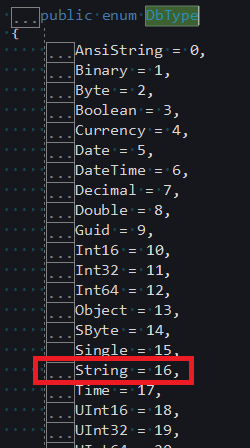
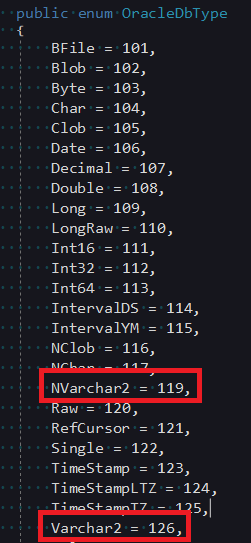
However, looking at the code for the latest version (3.21.100) of "Oracle.ManagedDataAccess.Core", it still maps
DbType.StringtoOracleDbType.Varchar2...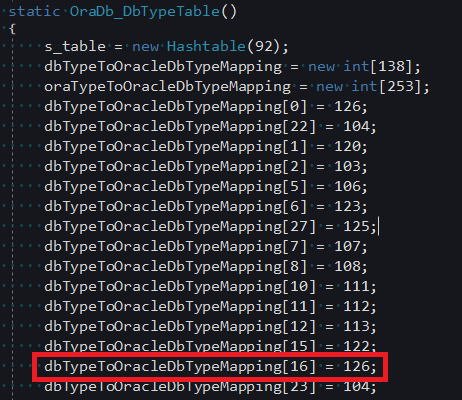
Customizing DynamicParameters
Since Dapper does not directly support using IDbDataParameter as a parameter, it is impossible to directly create an OracleParameter with the correct OracleDbType. Therefore, I had to customize a DynamicParameters class to handle this issue.
public class MyDynamicParameters : SqlMapper.IDynamicParameters {
    private readonly Dapper.DynamicParameters dynamicParameters = new();
    private readonly List<IDbDataParameter> dbDataParameters = new();

    // Implement the Dapper.DynamicParameters API using forwarding; one method is demonstrated below
    public void Add(string name, object value, DbType? dbType, ParameterDirection? direction, int? size) {
        dynamicParameters.Add(name, value, dbType, direction, size);
    }

    // ...Forwarding for other APIs...

    // Add support for IDbDataParameter
    public void Add(IDbDataParameter paramerter) {
        dbDataParameters.Add(paramerter);
    }

    // Dapper.DynamicParameters uses explicit implementation; this code should generally not be called externally
    void SqlMapper.IDynamicParameters.AddParameters(IDbCommand command, SqlMapper.Identity identity) {
        AddParameters(command, identity);
    }

    // Add parameters and forward to Dapper.DynamicParameters, then add IDbDataParameter to the IDbCommand parameter collection
    // I originally wanted to override Dapper.DynamicParameters.AddParameters to avoid writing forwarding, but it doesn't support override...
    protected void AddParameters(IDbCommand command, SqlMapper.Identity Identity) {
        // Since it was an explicit implementation, it must be cast to SqlMapper.IDynamicParameters to call AddParameters
        ((SqlMapper.IDynamicParameters)dynamicParameters).AddParameters(command, Identity);

        foreach (IDbDataParameter p in dbDataParameters) {
            command.Parameters.Add(p);
        }
    }
}The usage is as follows: replace the original DynamicParameters with MyDynamicParameters.
using (IDbConnection conn = new OracleConnection(connStr)) {
    conn.Open();

    MyDynamicParameters parameters = new();
    parameters.Add(new OracleParameter {
        ParameterName = "Name",
        Value = value,
        OracleDbType = OracleDbType.NVarchar2
    });
    conn.Query(sql, parameters);
}Change Log
- 2023-06-15 Initial version created.